
Selecting & securing the right MCP server for Dynamics 365
Dataverse, Power Apps, Customer Service, Sales, ERP, Business Central, Commerce, and Customer Insights each give agents a different kind of access. Here is how to keep them straight.
Deploying AI agents across Dynamics 365 requires matching the right Model Context Protocol server to the exact surface area your agents need to access. Here is a breakdown of how the entire stack lines up.
What is Model Context Protocol and why does it matter for Dynamics 365?
Model Context Protocol, or MCP, gives AI agents a consistent way to discover tools, call business systems, and work with data without requiring developers to write custom API wrappers for every agent. For Dynamics 365 and Power Platform, Microsoft is not shipping one giant "Dynamics MCP server." It is shipping several MCP servers, and at first glance that can be confusing.
But the pattern makes sense once you separate the layers:
- Dataverse MCP is the platform data, metadata, and admin layer.
- Power Apps MCP is the human-in-the-loop app experience layer.
- Dynamics 365 Sales MCP is the seller workflow layer.
- Dynamics 365 Customer Service MCP is the case, knowledge, and service workflow layer.
- Dynamics 365 ERP MCP is the Finance and Supply Chain business operation layer.
- Business Central MCP is the SMB ERP data and business logic layer.
- Dynamics 365 Commerce MCP is the agentic shopping and checkout layer.
- Customer Insights MCP is emerging as the consent and customer engagement compliance layer.
- The Dataverse layer is broader than CRUD (create, read, update, delete). It is also where platform admin and maker work show up: metadata, environments, security, configuration, and solutions.
In other words, there are many MCP servers because work happens at different levels. A case resolution tool is not the same thing as a Dataverse record update. A sales qualification tool is not the same thing as a Business Central posting action. And a checkout tool needs to respect promotions, taxes, inventory, payment flow, and shopper identity in a way that a generic CRUD tool never should.
Quick guide: Choosing the right MCP server
Use the most business-specific MCP server that matches the job, then add Dataverse MCP when the agent also needs broad table, record, or metadata access.
If you are building the agent in Copilot Studio, start by adding MCP servers as tools, reviewing the tool list, turning off unneeded tools, applying Power Platform data policies, and testing tool calls before publishing.
But remember, Copilot Studio is just one agent-building surface and MCP client.
Dataverse MCP can also be used from agents built in Microsoft Foundry, developer tools such as VS Code and GitHub Copilot, and non-Microsoft MCP-capable clients (such as Claude Code, Codex, and ChatGPT Enterprise), assuming the client is supported, allowed for the environment, and authenticated correctly.
Here’s a quick guide:
- If you are building a support agent, start with Customer Service MCP, and if the support agent also needs to read or update related Dataverse records, add Dataverse MCP.
- If you are building a seller agent, start with Sales MCP. If it needs broad CRM CRUD, add Dataverse MCP.
- If you are building an ERP operations agent for Finance or Supply Chain, use Dynamics 365 ERP MCP.
- If you are building a Business Central agent, use Business Central MCP.
- If you are building a model-driven app agent that needs user supervision, review tasks, or assisted data entry, use Power Apps MCP.
- If you are building an admin assistant, separate configuration lookup from configuration change. Start with Dataverse MCP for platform data, metadata, schema, app, environment, security, configuration, and solution-management tasks that are exposed through supported tools and permissions. Use a custom MCP server or Logic Apps MCP when you need to wrap an approved admin process with validation, approvals, and audit logging.
If Microsoft does not provide the exact tool your process needs, consider exposing your own MCP server, which can be done either through Azure Logic Apps Standard workflows or a custom implementation.
Dataverse MCP server: The platform layer
Microsoft Dataverse can act as a remote MCP server at:
The Dataverse MCP server exposes tools for searching data, searching metadata, creating and updating records, deleting records with explicit approval, creating and updating tables, running supported SQL SELECT queries, and uploading or downloading files.
The current documented tool list includes:
The Dataverse MCP server is useful when an agent needs broad platform access: tables, records, metadata, SQL-style reads, app data, skills, and files. It is the closest thing to "give my agent structured access to my Dataverse environment."
It helps to split Dataverse MCP into two jobs.
First, it is a data access and CRUD surface. Tools such as search_data, read_query, create_record, update_record, delete_record, file upload, and file download let agents read and work with Dataverse data.
Second, it is a maker and admin surface. Tools such as search, describe, create_table, update_table, delete_table, upsert_skill, and delete_skill are about metadata, apps, skills, schema, and configuration. In admin scenarios, that same Dataverse/Power Platform MCP family is where environment management, security, configuration, and solution-management tasks belong when they are exposed through supported tools, and the caller has the right privileges.
Creating a contact is not the same kind of action as creating a table, changing a security-related setting, modifying configuration, or moving a solution. Those are admin actions. They need stronger guardrails than ordinary record reads.
Its strength is breadth. Its risk is also breadth. You need to be thoughtful about environment enablement, allowed clients, security roles, solution boundaries, tool selection, and destructive actions.
Documentation:
- Connect to Dataverse with Model Context Protocol
- Use preview tools and upcoming features in the Dataverse MCP server
- Configure the Dataverse MCP server for an environment
- Microsoft MCP management MCP server reference
Power Apps MCP Server: The human-in-the-loop layer
The Power Apps MCP server is easy to misunderstand if you expect it to be Dataverse MCP, but for Power Apps. It is more specific than that.
Microsoft Learn describes the Power Apps MCP server as a way for agents to communicate with Power Apps for human-in-the-loop supervision and agentic workflows. It supports the agent feed in model-driven apps, including review, assistance, and data-entry scenarios.
The documented tools are:
With the Power Apps MCP, records are never created automatically by invoke_data_entry; the user reviews and saves the proposed record.
Think of the Power Apps MCP as supervised autonomy. It lets AI agents do useful work while still bringing humans into the loop at the right moment.
Documentation:
Dynamics 365 Customer Service MCP server: The service workflow layer
The Dynamics 365 Customer Service MCP tools give agents consistent service actions: case management, customer context, knowledge management, email assistance, activity creation, timeline context, and service administration.
The service tools are not primarily for representatives to call directly. Reps and supervisors use an AI agent like Microsoft’s Service Agent, and the agent chooses the right tool behind the scenes.
Examples of service capabilities include:
- retrieve case details
- summarize customer interactions
- find knowledge articles
- draft, rewrite, translate, and send email
- add notes and activities
- update, assign, or resolve cases
- support interactive app-in-chat experiences
Access is governed by Dataverse security privileges. The Customer Service MCP docs say a user must have the privileges required by a tool before that tool becomes discoverable, and privileges are also enforced at runtime.
Its strength is business context and meaning. A tool like "resolve case" is safer and more useful than asking a generic database tool to update status fields correctly, as an operation like resolving a case needs to be aware of business logic and rules around case closure.
Documentation:
- Connect Dynamics 365 CX MCP Server - Service through Agent 365 Tooling Gateway
- Overview of Dynamics 365 Customer Service MCP tools
Dynamics 365 Sales MCP server: The seller workflow layer
The Sales MCP server exposes sales-specific tools that AI agents can use to retrieve sales data, generate insights, draft emails, and perform sales tasks. The available tools are grouped into:
- Sales Qualification Agent capabilities
- Sales Opportunity Agent capabilities
- Copilot in Dynamics 365 Sales capabilities
The current tools include research, outreach, catch-up, summary, opportunity health, stakeholder, signal, risk, and SharePoint-grounded sales insight tools. The Sales MCP server also supports Dataverse CRUD operations across sales scenarios, but the Sales setup documentation recommends also adding the Dataverse MCP server when you want CRUD operations on Dataverse records outside of the core sales scenarios.
Its strength is seller-ready intelligence. It is not just "read the lead row." It can use Dynamics 365 Sales AI capabilities to produce summaries, research, outreach drafts, opportunity insights, and qualification assessments.
Documentation:
- Dynamics 365 Sales Model Context Protocol server overview
- Connect your AI agents and assistants to Dynamics 365 Sales MCP Server
Dynamics 365 ERP MCP server: Finance and Operations
For finance and operations apps, the Dynamics 365 ERP MCP server enables AI agents to work with data and business logic in D365 Finance and Supply Chain Management.
The tools fall into three categories:
- Data tools: create, read, update, and delete data through data entities.
- Form tools: interact with server-side form APIs in a way that resembles how a user works in the app, but without driving the browser UI.
- Action tools: find and invoke custom business logic classes exposed through the AI tool framework.
This design builds the agent's view from the authenticated user's security permissions, application configuration, extensions, and personalization. The agent sees only the menu items, entities, fields, and actions the user's role can access.
Prerequisites include supported finance and operations app versions, enabling the Dynamics 365 ERP Model Context Protocol server feature if needed, adding allowed MCP clients, and using a Tier 2 or above environment or Unified Developer Environment.
Its strength is ERP reach: data entities, forms, and custom actions, governed by the same security model users already live in.
Documentation:
Business Central MCP server: The SMB ERP layer
Business Central has its own MCP server for Business Central online. It lets AI clients such as Copilot Studio, GitHub Copilot in VS Code, Claude, ChatGPT, and custom agents interact with Business Central data and business logic.
The target tenant, environment, company, and optional configuration are provided through HTTP headers.
By default, Business Central MCP gives read-only access to exposed Business Central API pages. To enable writes, administrators configure API page objects with permissions for create, modify, delete, and bound actions. Business Central also supports dynamic tool mode, which helps when many API pages would otherwise exceed a client's tool limit.
Its strength is controlled ERP access. You can decide which API pages are visible, which operations are allowed, and whether an agent can discover additional objects.
Documentation:
Customer Insights MCP server: Consent and compliance
Microsoft Learn has preview documentation for Customer Insights MCP consent tools. These tools are designed for compliant outbound communication, especially when agents need to check consent before sending email, SMS, or custom-channel messages.
The core tools are:
The Customer Insights consent tools use the same consent rules enforced during journey execution. The server is built on the Dataverse custom API pattern and delegates business logic to the Backend Consent Service. Shared Consent can also operate without a full Customer Insights installation, so consent tools may be available in environments where only Dynamics 365 Sales or Contact Center is deployed.
Its strength is compliance at send time. Instead of letting every agent reimplement consent logic badly, the agent asks the system that owns consent.
Documentation:
Security: MCP does not make permissions optional
A bad mental model for MCP is: "I connected the agent to Dynamics, so now the agent can do anything." That is not how the Microsoft servers are designed, and it is not how you should design your own.
Think of MCP as a tool doorway, not a security bypass. The agent still needs an authenticated identity, the source system still enforces permissions, and the admin still controls which clients and tools are allowed.
The big security controls to keep straight are:
- User context: Microsoft repeatedly anchors MCP actions in the caller's identity and permissions. Business Central says operations run with the user's identity and permissions. Finance and operations filter menu items, entities, fields, forms, APIs, and actions based on the authenticated user's security role. Customer Insights consent tools enforce authorization inside the tool logic using the caller's user context.
- Dataverse security: Dataverse-backed MCP tools are governed by Dataverse roles, privileges, and row-level access. Customer Service MCP tools also depend on Dataverse security privileges; tools may not even be discoverable unless the user has the required privileges.
- Allowed clients: Several servers require admins to explicitly allow MCP clients. Dataverse has environment settings for MCP clients. The Dataverse docs say Copilot Studio is enabled by default, but additional clients have to be enabled before they can connect. That is where you govern clients such as VS Code GitHub Copilot, Claude Code, Codex, ChatGPT Enterprise, and Foundry-built agents if they are being used against that environment. Finance and operations has an Allowed MCP Clients page. Commerce requires agent applications to be registered and authorized.
- OAuth and app registrations: Customer Service through Agent 365 Tooling Gateway uses OAuth discovery and delegated permissions. Business Central uses OAuth 2.0 Authorization Code with PKCE and Entra ID. Logic Apps MCP servers can use Easy Auth or keys, with OAuth the better enterprise default.
- Tool selection: In Copilot Studio, adding an MCP server does not mean every tool has to stay enabled. You can turn off individual MCP tools. That matters when the server exposes more capability than a specific agent should use.
- Data policies: Copilot Studio access to MCP servers relies on Power Platform connectors, so Power Platform data policies can govern access to MCP servers and their tools.
- Admin scope: Treat Dataverse admin MCP tools as privileged automation. Reading environment configuration, summarizing security setup, inspecting metadata, or drafting a solution change plan is different from creating an environment, changing security, modifying configuration, deleting a table, or moving solution components. Split read tools from write tools and make write tools harder to invoke.
- Approval moments: Destructive tools should require explicit confirmation. Dataverse documents delete tools as requiring explicit user approval. Power Apps MCP is also important here because it gives agents a native way to log work for review or request assistance before proceeding.
- Data boundary review: Customer Service documentation specifically warns that connecting Dynamics 365 to non-Dynamics or external MCP clients can allow data to leave the Dynamics 365 FedRAMP High boundary. Even outside government scenarios, that warning is the right posture: know where prompts, tool inputs, tool outputs, and logs are processed.
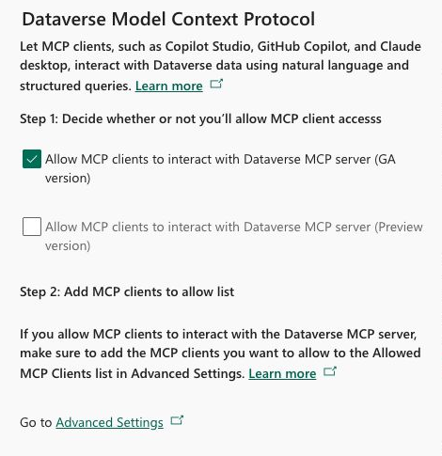
The practical governance pattern is simple:
- Start with least privilege for the user or agent identity.
- Allow only the MCP clients you actually intend to support.
- Disable tools the agent does not need.
- Treat write, send, post, resolve, delete, checkout, admin changes, and consent-affecting actions as high risk.
- Add human review where a wrong action would be expensive, embarrassing, regulated, or hard to unwind.
- Log tool calls and keep enough telemetry to explain what happened after the fact.
For custom MCP servers, be stricter than you think you need to be. A custom tool should wrap a business action, validate inputs, enforce source-system permissions, produce auditable logs, and return useful errors. Do not hand the model a generic "run arbitrary operation" tool and hope the prompt keeps it civilized.
Licensing & cost: What to verify before production
The licensing story is not a single sentence, because it depends on the server, client, identity, and license.
- Copilot Studio usage is measured in Copilot Credits unless covered by Microsoft 365 Copilot licensed user scenarios.
- Dataverse MCP tools are charged when accessed by AI agents created outside Microsoft Copilot Studio. According to Microsoft Learn, users with Dynamics 365 Premium licenses such as Sales Premium, Finance Premium, Supply Chain Premium, Customer Service Premium, or a Microsoft 365 Copilot USL are not charged for accessing Dynamics 365 data from outside Copilot Studio.
- Sales MCP tools consume Copilot Studio credits based on the agent feature used. The Sales MCP docs say Copilot credits are not charged for specific Dynamics 365 Sales licenses and point readers to the Dynamics 365 Licensing Guide under the "Model Context Protocol (MCP) for Dynamics 365" section.
- Dynamics 365 ERP MCP has two cost categories: orchestration cost and MCP server execution cost. In Copilot Studio, execution is included in the fixed Agent Action rate. In other clients, ERP MCP server execution is billed at 0.1 Copilot Credits per tool call, with LLM orchestration billed separately by the client. Finance Premium and Supply Chain Management Premium licenses are exempt from that tool execution billing for agents built on non-Copilot Studio clients.
- For finance and operations, the docs say the agent identity does not need an additional Dynamics 365 finance and operations user license when assigned the System agent security role, but users interacting with an agent still need the appropriate Dynamics 365 application license to access app data and operations.
- Business Central, Commerce, Customer Service, Power Apps, and Customer Insights docs include prerequisites and security requirements, but for final pricing you should verify against the latest product licensing guides and your customer's tenant licensing model.
Documentation:
- Copilot Studio billing rates and management
- Dynamics 365 Licensing Guide
- Microsoft Copilot Studio Licensing Guide
Why are there so many specialized tools for D365?
Because "Dynamics 365" is not one application, and agents need more than table access.
A generic data tool can create a row. A business tool can resolve a case, qualify a lead, post an invoice, check consent, create a payment link, or ask a human to review a proposed record.
That distinction matters for three reasons.
Second, each app has its own security and runtime context. Finance and operations form tools return the application view model filtered by user role. Business Central tools depend on API page configurations. Customer Service tools depend on Dataverse privileges. Commerce tools depend on shopper identity, channel context, pricing, inventory, and checkout rules.
Third, specialized servers reduce the agent's tool-choice problem. A small set of clear tools is easier for an agent to choose from than a huge bag of table operations.
How do I keep all these MCP tools straight?
Use the right MCP server for the job.
The cleanest implementation is usually not one MCP server. It is a small set of MCP servers that match the agent's job.
For example:
- A case resolution agent might use Customer Service MCP for case workflows, Dataverse MCP for related records, Customer Insights MCP for consent, and Business Central MCP for order status.
- A lead-to-cash agent might use Sales MCP for lead qualification, Business Central or ERP MCP for quote/order creation, and Customer Service MCP if a post-sale support ticket is needed.
- An autonomous data-entry agent in a model-driven app might use Power Apps MCP for review and Dataverse MCP for record context.
- An admin assistant might use Dataverse MCP for schema inspection, security review, configuration lookup, and solution-management tasks, then use a custom MCP server for any organization-specific change process that needs approval and audit logging.
When to create your own MCP server
Do not create your own MCP server just because MCP is shiny. Microsoft-provided MCP servers should usually be the first stop when they meet the need, especially when the agent needs supported Dynamics application actions to resolve a case, qualify a lead, post an ERP action, check consent, create a cart, review configuration, inspect metadata, manage solution-related work, or work through the same business logic the application already governs.
But the design question is not simply "Which MCP server can I connect?" The better question is: "What job should this agent do for the customer, seller, service team, or administrator?"
That distinction is very important for headless CRM. A headless agent is not trying to mimic the Dynamics user interface. It is trying to complete a customer, seller, service, or operations task without making the user care which system owns each step. That work may need Dataverse records, Customer Service case actions, ERP order status, Business Central invoices, Commerce product or order data, SharePoint documents, customer consent, and aggregate analytics from Fabric. At that point, wiring every product MCP server directly into the agent can add noise, cost, and governance work.
This is where TTEC Digital’s approach can be a better fit: use Microsoft-provided MCP servers where they expose the right app action but create a smaller headless layer when the agent needs one business-facing toolset across a broader application footprint. Fabric can sit behind that layer as the governed data and analytics source, giving the agent aggregate context such as customer history, product usage, churn risk, service trends, revenue impact, or operational KPIs without forcing the agent to rebuild analytics one tool call at a time.
In practical terms, the custom MCP server becomes the agent's contract with the business process. Instead of giving the agent twenty tools across CRM, ERP, analytics, and document systems, you expose a smaller set of business tools: "get customer operating context," "prepare renewal brief," "triage account health," "open service-and-order timeline," "calculate save offer," or "create follow-up plan." Behind those tools, your implementation can call Dynamics, Fabric, ERP, knowledge sources, and workflow systems in the right order, with the right security and logging.
That can simplify the agent, reduce duplicate integration work, and help control cost because the model calls fewer, more purposeful tools. It also gives IT and security leaders a clearer place to enforce permissions, approval rules, telemetry, data boundaries, and exception handling.
Create your own MCP server when the agent needs a tool that is not safely or cleanly represented by an existing Microsoft MCP server.
Good reasons to create your own MCP server include:
- You need to expose a proprietary system that has no Microsoft MCP server.
- You need to wrap a multi-step business process as one safe tool.
- You need additional validation, approval, or policy enforcement before an action runs.
- You need to hide implementation complexity from the agent.
- You need to combine several systems behind a single business action.
- You need Fabric-backed analytics, aggregates, or customer intelligence as part of the agent's operating context.
- You need a headless CRM experience where the agent works across sales, service, ERP, knowledge, and analytics without exposing all of that complexity to the user.
- You need an admin action that should be one governed business operation, not a model improvising across several high-privilege APIs.
- You need a stable tool contract even while underlying APIs change.
Bad reasons to create your own MCP server include:
- You only need normal Dataverse CRUD.
- You want to bypass Dynamics security.
- You want the agent to do destructive work without approval.
- You are recreating a Microsoft MCP server because you have not checked the catalog.
For a low-code route, Azure Logic Apps Standard can expose workflows as remote MCP servers. That gives you access to connectors, workflow run history, monitoring through Application Insights or Log Analytics, OAuth through Easy Auth, API key options, private networking options, and a familiar way to package enterprise workflow steps as tools.
For a code-first route, build a custom MCP server when you need tighter control over tool schemas, runtime behavior, authorization, observability, cost, or deployment. Keep the tool list small. Give every tool a precise description. Make destructive tools require explicit confirmation. Log tool calls. Respect source-system permissions. And design for the human who has to explain what the agent just did.
Documentation:
- Create remote MCP servers from Standard workflows in Azure Logic Apps
- Microsoft MCP server certification
The bottom line
The point of MCP in Dynamics 365 is not simply "let AI access my data." We already had APIs for that.
The point is to give agents a governed way to act. Dataverse MCP gives the agent platform access, including data, metadata, and admin work when the right tools and permissions are in place. App-specific MCP servers give it business actions. Power Apps MCP gives it a human review path. Copilot Studio, Microsoft Foundry, developer tools, and other enterprise AI clients are places where those tools can be used. Custom MCP servers let you add the business tools only your organization understands.
That is why there are so many Dynamics 365 MCP servers. Not because Microsoft needed more product names, although they do seem professionally committed to the craft. But because agents need the right level of context: data when data is enough, business actions when the process matters, and human review when trust requires it.
[cta-1]
Ready to move from AI agent experimentation to governed execution?

As a Senior Principal Architect with more than 250 deployments of Power Apps and Dynamics 365 under his belt, Joel helps companies address business challenges and empower their users and makers with AI, CRM, and low-code applications.
